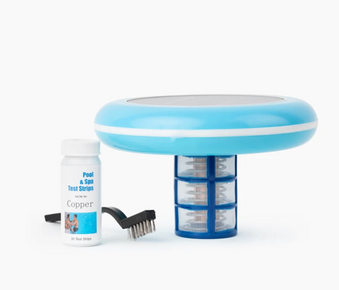
Replace Nature2 W28001 DuoClear mineral cartridge every 4 to 6 months or at season start. Turn off pump, unscrew vessel cap, remove old cartridge, insert new cartridge with flow arrow pointing toward pool, replace cap hand tight, restart pump. Test copper levels after 48 hours and maintain 0.2 to 0.4 ppm. This guide covers complete replacement procedures, timing, and maintenance for optimal mineral sanitization.
Table of Contents
What is Nature2 DuoClear System?
Nature2 W28001 DuoClear is an inline mineral pool sanitizer that combines silver and copper minerals with an integrated chlorine delivery system. The replaceable mineral cartridge releases silver ions for bacteria control and copper ions for algae prevention, while the chlorine chamber provides supplemental sanitization. This dual action system reduces overall chlorine usage by up to 50% while maintaining clean, clear pool water.
Key Features of DuoClear System
- Dual sanitization: Combines minerals and chlorine in one unit
- Mineral cartridge: Silver and copper for natural water treatment
- Chlorine chamber: Holds chlorine tablets for supplemental sanitization
- Reduces chlorine by 50%: Significantly lowers chemical usage
- Cartridge lifespan: 4 to 6 months per cartridge
- Pool capacity: Treats pools up to 25,000 gallons
- Inline installation: Installs in return line after filter
- Easy replacement: Simple cartridge change without plumbing work
When combined with proper weekly pool cleaning routines, the DuoClear system provides effective sanitization with reduced chemical dependency.
When to Replace Your Mineral Cartridge
Replacement Schedule
Replace your Nature2 DuoClear mineral cartridge based on these guidelines:
- Every 4 to 6 months: Standard replacement interval
- At season start: Install fresh cartridge when opening pool
- After 6 months maximum: Even if season isn't over
- When copper levels drop: Below 0.2 ppm consistently
- Increased algae growth: Despite proper chlorine levels
- Water quality decline: Cloudiness or dullness appears
Signs Your Cartridge Needs Replacement
- Copper levels consistently test below 0.2 ppm
- Algae growth despite maintaining proper chlorine
- Water appears dull or lacks sparkle
- Increased chlorine consumption
- Cartridge has been installed for 6 months or longer
- Visible mineral depletion if cartridge is inspected
Learn about replacement kits and maintenance schedules for mineral sanitization systems.
Before You Begin: Preparation
What You'll Need
- New Nature2 W28001 DuoClear mineral cartridge
- Towel or rag for cleanup
- Bucket or container (to catch water)
- Copper test strips or test kit
- Pool water test kit
- Gloves (optional but recommended)
Pre Replacement Checklist
- Purchase correct replacement cartridge (W28001 for DuoClear)
- Choose appropriate time (not before pool party or heavy use)
- Ensure you have 48 to 72 hours before needing pool
- Check current water chemistry
- Have test strips ready for post replacement testing
- Read cartridge packaging instructions
Safety Considerations
- Turn off pool pump before beginning
- Allow pressure to release from system
- Wear gloves if handling old cartridge
- Dispose of old cartridge properly
- Keep new cartridge dry until installation
Step by Step Replacement Guide
Step 1: Turn Off Pool Pump
Safety first before servicing the DuoClear unit:
- Turn off pool pump at breaker or timer
- Turn off heater if installed
- Wait 2 to 3 minutes for water flow to stop completely
- Verify no water is flowing through system
- Release any pressure from system
Step 2: Locate and Access DuoClear Unit
Find and prepare the DuoClear unit for cartridge replacement:
- Locate DuoClear unit in return line (after filter and heater)
- Ensure adequate clearance for removing cartridge
- Place towel or bucket under unit to catch water
- Clear any obstructions around unit
- Have new cartridge ready nearby
Step 3: Remove Chlorine Tablets (If Present)
If chlorine tablets are in the chlorine chamber:
- Unscrew chlorine chamber cap (top section)
- Remove any chlorine tablets
- Set tablets aside in sealed container
- Note: You're replacing mineral cartridge, not chlorine chamber
- Replace chlorine chamber cap for now
Step 4: Open Mineral Cartridge Vessel
Access the mineral cartridge chamber:
- Locate mineral cartridge vessel (lower section of unit)
- Unscrew vessel cap by turning counterclockwise
- Hand tighten only, no tools needed
- Some water will drain out (this is normal)
- Set cap aside in clean location
Step 5: Remove Old Mineral Cartridge
Extract the depleted mineral cartridge:
- Grasp old cartridge firmly
- Pull cartridge straight out of vessel
- Note flow direction arrow on old cartridge
- Inspect old cartridge (minerals should be visibly depleted)
- Dispose of old cartridge properly
- Wipe inside of vessel with clean cloth if needed
Step 6: Install New Mineral Cartridge
Insert the fresh mineral cartridge:
- Remove new cartridge from packaging
- Locate flow direction arrow on new cartridge
- Insert cartridge into vessel with arrow pointing toward pool
- Ensure cartridge is fully seated in vessel
- Cartridge should fit snugly without forcing
- Verify proper orientation (arrow toward pool/return jets)
Step 7: Reassemble DuoClear Unit
Close up the unit and prepare for restart:
- Inspect o ring on vessel cap for damage
- Replace o ring if cracked or worn
- Thread vessel cap back onto unit
- Hand tighten cap securely (do not use tools)
- Ensure cap is fully tightened to prevent leaks
- Wipe exterior of unit clean
Step 8: Replace Chlorine Tablets
If using chlorine tablets in the chlorine chamber:
- Unscrew chlorine chamber cap
- Add 1 to 3 chlorine tablets (typically 3 inch trichlor)
- Replace chlorine chamber cap
- Hand tighten securely
- Adjust chlorine flow valve if present
Step 9: Restart Pool System
Return pool equipment to normal operation:
- Double check all caps are tightened
- Remove towels and buckets from area
- Turn pool pump back on
- Check for leaks around DuoClear unit
- Verify water is flowing through system
- Run pump for normal daily cycle
After Replacement: Testing and Adjustment
Initial 48 to 72 Hour Period
Allow time for mineral levels to establish:
- Run pump for normal daily cycle (8 to 12 hours)
- Do not shock pool during first 48 hours
- Maintain normal chlorine levels (0.5 to 1.0 ppm with DuoClear)
- Monitor water clarity
- Avoid heavy pool use if possible
Test Copper Levels After 48 Hours
Verify mineral cartridge is releasing properly:
- Wait 48 to 72 hours after installation
- Use copper test strips or test kit
- Target range: 0.2 to 0.4 ppm copper
- Below 0.2 ppm: Allow more time, retest in 24 hours
- Above 0.4 ppm: Reduce pump runtime temporarily
- Record copper level for future reference
Test Other Water Parameters
Ensure complete water balance:
- Free Chlorine: 0.5 to 1.0 ppm (with DuoClear system)
- pH: 7.2 to 7.6 (7.4 to 7.6 ideal)
- Total Alkalinity: 80 to 120 ppm
- Calcium Hardness: 200 to 400 ppm
- Adjust chemistry as needed
Understanding balanced pool water is essential for optimal mineral system performance.
Adjust Chlorine Levels
Fine tune chlorine with new mineral cartridge:
- Fresh cartridge releases minerals more actively
- May be able to reduce chlorine slightly
- Monitor water quality closely for first week
- Adjust chlorine tablets or chlorinator as needed
- Never let chlorine drop below 0.5 ppm
Ongoing Maintenance Schedule
Weekly Maintenance Routine
Every Week:
- Test free chlorine (maintain 0.5 to 1.0 ppm)
- Test pH (maintain 7.2 to 7.6)
- Test alkalinity (maintain 80 to 120 ppm)
- Add chlorine tablets to chamber as needed
- Skim surface and empty skimmer baskets
- Brush pool walls and floor
- Vacuum pool if needed
- Check filter pressure and clean if needed
Follow comprehensive weekly pool cleaning routines for best results.
Monthly Maintenance Tasks
- Test copper levels (maintain 0.2 to 0.4 ppm)
- Test calcium hardness
- Deep clean or backwash filter
- Inspect DuoClear unit for leaks
- Clean pool tiles and waterline
- Check cartridge age and plan replacement
Cartridge Replacement Tracking
Keep records for optimal maintenance:
- Mark installation date on calendar
- Set reminder for 4 month check
- Set reminder for 6 month replacement
- Keep spare cartridge on hand
- Order replacement before current expires
- Track copper levels monthly
Learn about how replacement kits improve daily pool water quality.
Seasonal Considerations
Spring Opening:
- Install fresh mineral cartridge at season start
- Replace even if old cartridge is less than 6 months
- Test all water parameters
- Allow 48 to 72 hours for mineral levels to establish
Mid Season:
- Replace cartridge at 4 to 6 month mark
- Don't wait for problems to appear
- Test copper levels before and after replacement
Fall Closing:
- Remove cartridge if winterizing pool
- Store cartridge in sealed bag if less than 6 months old
- Can reuse next season if stored properly
- For best results, start each season with fresh cartridge
Pro Tips for Maximum Cartridge Life
Expert Tips from Pool Professionals
- Replace on schedule: Don't wait for problems, replace every 4 to 6 months
- Install at season start: Fresh cartridge provides best performance
- Hand tighten only: Never use tools on caps, can crack housing
- Check flow direction: Arrow must point toward pool/return jets
- Test copper monthly: Regular testing ensures optimal mineral levels
- Balance pH first: Proper pH ensures optimal mineral release
- Remove during shocking: Take out cartridge when shocking with high chlorine
- Keep spare on hand: Always have replacement cartridge ready
- Mark installation date: Track cartridge age for timely replacement
- Store properly: Keep unused cartridges in cool, dry location
Avoid Common Mistakes
- Using cartridge too long: Replace at 6 months maximum
- Wrong flow direction: Arrow must point toward pool
- Overtightening caps: Hand tight only, tools can crack housing
- Not testing copper: Regular testing prevents problems
- Shocking with cartridge installed: High chlorine damages minerals
- Poor water balance: High pH reduces mineral effectiveness
- Forgetting installation date: Track age for timely replacement
- Not having spare: Order replacement before current expires
Avoid common pool cleaning mistakes that reduce sanitizer effectiveness.
Maximizing Cartridge Performance
Water Chemistry: Maintain proper balance for optimal mineral release. High pH significantly reduces effectiveness.
Pump Runtime: Run pump 8 to 12 hours daily for proper mineral distribution throughout pool.
Regular Testing: Test copper monthly and chlorine weekly to ensure system is working properly.
Timely Replacement: Replace cartridge every 4 to 6 months regardless of appearance for consistent performance.
Troubleshooting Common Issues
Problem: Low Copper Levels After Replacement
Solutions:
- Allow 48 to 72 hours for minerals to establish
- Verify cartridge is installed with flow arrow toward pool
- Check that water is flowing through DuoClear unit
- Test pH (high pH reduces mineral release)
- Increase pump runtime to 10 to 12 hours daily
- Verify cartridge is genuine Nature2 replacement
Problem: Leaks After Cartridge Replacement
Solutions:
- Turn off pump immediately
- Check vessel cap is hand tightened securely
- Inspect o ring on cap for damage
- Replace o ring if cracked or worn
- Ensure cap threads are clean and undamaged
- Retighten cap and restart pump
Problem: Algae Growth After New Cartridge
Solutions:
- Test copper levels (should be 0.2 to 0.4 ppm)
- Test chlorine (maintain minimum 0.5 ppm)
- Verify cartridge flow direction is correct
- Shock pool (remove cartridge first)
- Add algaecide (like No Mor Problems Algaecide)
- Brush pool surfaces vigorously
- Clean filter thoroughly.
Problem: Cloudy Water After Replacement
Solutions:
- Test and balance pH to 7.4 to 7.6
- Test chlorine and raise to 1.0 to 2.0 ppm temporarily
- Clean or backwash filter
- Run pump continuously for 24 hours
- Add clarifier if needed
- Verify copper levels are 0.2 to 0.4 ppm
For severe cloudiness, see how to fix green pool quickly.
Problem: High Copper Levels or Staining
Solutions:
- Test copper (if above 0.4 ppm, take action)
- Reduce pump runtime temporarily
- Balance pH to 7.4 to 7.6 (low pH increases copper release)
- Use metal sequestrant to prevent staining
- Partially drain and refill if copper is very high
- Verify cartridge is correct model for your pool size
Frequently Asked Questions
How often should I replace the Nature2 DuoClear cartridge?
Replace the mineral cartridge every 4 to 6 months or at the beginning of each pool season. Do not use a cartridge for more than 6 months even if it appears to have minerals remaining.
Can I reuse a cartridge from last season?
If you removed the cartridge at season end and it's less than 6 months old, you can store it in a sealed plastic bag and reuse it next season. However, for best results, start each season with a fresh cartridge.
Do I need to remove chlorine tablets when replacing the mineral cartridge?
It's recommended to remove chlorine tablets from the chlorine chamber before replacing the mineral cartridge, though not strictly necessary. This prevents confusion and ensures you're working on the correct chamber.
What's the difference between the mineral cartridge and chlorine chamber?
The DuoClear has two chambers: the mineral cartridge (lower section) contains silver and copper minerals and needs replacement every 4 to 6 months. The chlorine chamber (upper section) holds chlorine tablets that you refill as needed.
How do I know which direction to install the cartridge?
Look for the flow direction arrow on the cartridge. This arrow must point toward the pool (in the direction of water flow to return jets). Installing backwards reduces effectiveness.
Can I shock my pool with the new cartridge installed?
No. Remove the mineral cartridge before shocking with high chlorine levels (above 5 ppm). High chlorine can damage the minerals. Return the cartridge after chlorine drops below 3 ppm.
Why are my copper levels still low after installing a new cartridge?
Allow 48 to 72 hours for mineral levels to establish. If still low, verify correct installation (flow arrow toward pool), check pH (high pH reduces release), and ensure adequate pump runtime (8 to 12 hours daily).
What should I do with the old cartridge?
Dispose of the old mineral cartridge in your regular trash. The minerals are depleted and the cartridge cannot be recycled or reused.
Do I need special tools to replace the cartridge?
No tools are needed. The vessel cap is designed to be hand tightened only. Using tools can crack the housing and cause leaks.
How long does it take to replace the cartridge?
Cartridge replacement typically takes 10 to 15 minutes including turning off the pump, replacing the cartridge, and restarting the system.
Conclusion
Replacing your Nature2 W28001 DuoClear mineral cartridge every 4 to 6 months is essential for maintaining effective mineral pool sanitization. By following proper replacement procedures, testing copper levels regularly, and maintaining balanced water chemistry, you can enjoy reduced chlorine usage, softer water, and consistent water quality all season long.
Key Takeaways
- Replace cartridge every 4 to 6 months or at season start
- Turn off pump before beginning replacement
- Install cartridge with flow arrow pointing toward pool
- Hand tighten caps only, never use tools
- Test copper levels 48 to 72 hours after replacement
- Maintain 0.2 to 0.4 ppm copper for optimal performance
- Remove cartridge before shocking pool
- Keep spare cartridge on hand for timely replacement
- Track installation date for replacement planning
- Balance pH to 7.4 to 7.6 for best mineral release
For those seeking even greater chlorine reduction and a maintenance free solution that never requires cartridge replacement, consider upgrading to a Solar Pool Ionizer which can reduce chlorine needs by up to 85% while providing continuous mineral sanitization powered entirely by the sun with electrode replacement only once per season.