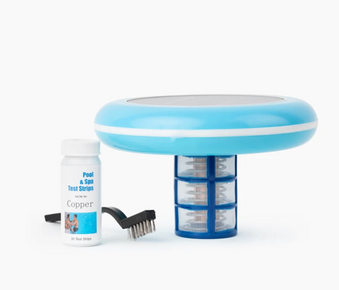
Nature2 W20086 Express is a mineral pool sanitizer that uses silver and copper to reduce chlorine needs by up to 50%. Install in return line after filter, replace cartridge every 4-6 months, maintain 0.5-1.0 ppm chlorine, and test copper levels monthly. This guide covers complete installation, maintenance, and troubleshooting for effective mineral pool sanitization.
Table of Contents
What is Nature2 W20086 Express?
Nature2 W20086 Express is an inline mineral pool sanitizer that uses a patented blend of silver and copper minerals to naturally sanitize pool water. This system installs directly into your pool's return line after the filter, releasing minerals that kill bacteria and prevent algae growth while reducing chlorine usage by up to 50%.
Key Features of Nature2 Express System
- Mineral based sanitization: Uses silver and copper for natural water treatment
- Reduces chlorine by 50%: Significantly lowers chemical usage and costs
- Easy installation: Installs inline in return plumbing after filter
- Long lasting cartridge: Each cartridge lasts 4 to 6 months
- Pool capacity: Treats pools up to 25,000 gallons
- Compatible with all sanitizers: Works with chlorine, salt systems, and other treatments
- Safe for all surfaces: Compatible with vinyl, fiberglass, plaster, and tile
- Automatic operation: Works continuously without daily attention
When combined with proper weekly pool cleaning routines, Nature2 Express provides effective sanitization with reduced chemical dependency.
How Does Mineral Sanitization Work?
Nature2 Express uses a mineral cartridge containing silver and copper that releases ions into your pool water as water flows through the system. These minerals work together to provide comprehensive water treatment.
The Mineral Sanitization Process
- Pool water flows through filter then into Nature2 unit
- Water passes through mineral cartridge inside unit
- Silver and copper ions are released into water
- Silver ions kill bacteria and viruses
- Copper ions prevent algae growth
- Treated water returns to pool through return jets
- Minerals remain active in water for continued protection
Benefits of Mineral Pool Sanitization
- Reduced chlorine usage: Cut chlorine needs by 50% or more
- Softer water feel: Gentler on skin, eyes, and hair
- Less chemical odor: Minimal chlorine smell
- Lower maintenance: Fewer chemical additions required
- Algae prevention: Copper naturally inhibits algae growth
- Bacteria control: Silver provides antimicrobial protection
- Cost effective: Reduces ongoing chemical expenses
- Eco friendly: Natural minerals are environmentally responsible
Understanding balanced pool water is essential for optimal Nature2 performance.
Step by Step Installation Guide
Before You Begin: Pre Installation Checklist
Ensure you have everything needed for installation:
- Nature2 W20086 Express unit with mineral cartridge
- Installation fittings included with unit
- Teflon tape or pipe thread sealant
- Adjustable wrench or pliers
- Hacksaw or PVC cutter (if cutting pipe)
- PVC primer and cement (if using PVC connections)
- Measuring tape
- Safety goggles
Step 1: Choose Installation Location
Select the proper location for Nature2 Express:
- Install in return line AFTER the filter and heater
- Install BEFORE any chemical feeders or chlorinators
- Choose location with easy access for cartridge replacement
- Ensure adequate clearance for removing cartridge (12 inches minimum)
- Install horizontally or vertically (horizontal preferred)
- Avoid locations exposed to direct sunlight or freezing temperatures
Step 2: Turn Off Pool Equipment
Safety first before beginning installation:
- Turn off pool pump at breaker or timer
- Turn off heater if installed
- Close valves to isolate section where installing
- Release pressure from system
- Verify no water is flowing
Step 3: Cut Return Line Pipe
Prepare the pipe for Nature2 installation:
- Measure Nature2 unit length (approximately 12 inches)
- Mark pipe where unit will be installed
- Use hacksaw or PVC cutter to cut pipe cleanly
- Remove burrs from cut edges with sandpaper or deburring tool
- Dry fit Nature2 unit to verify proper length
- Adjust cuts if necessary for proper fit
Step 4: Install Nature2 Unit
Connect Nature2 Express to your plumbing:
For PVC Connections:
- Apply PVC primer to pipe ends and fitting sockets
- Apply PVC cement to primed surfaces
- Insert pipe into Nature2 fittings quickly
- Hold for 30 seconds to ensure proper bond
- Wipe excess cement
- Allow to cure per cement manufacturer instructions (typically 2 hours)
For Threaded Connections:
- Wrap Teflon tape clockwise around male threads (3 to 5 wraps)
- Thread Nature2 fittings onto pipe hand tight
- Use wrench to tighten an additional 1 to 2 turns
- Do not overtighten (can crack fittings)
- Check alignment and adjust if needed
Step 5: Install Mineral Cartridge
Insert the mineral cartridge into Nature2 unit:
- Unscrew Nature2 unit cap (hand tighten only)
- Remove mineral cartridge from packaging
- Note flow direction arrow on cartridge
- Insert cartridge into unit with arrow pointing toward pool
- Ensure cartridge is fully seated
- Replace cap and hand tighten securely
- Do not use tools to tighten cap
Step 6: Test for Leaks
Verify installation is watertight:
- Open valves slowly to fill system
- Turn on pool pump
- Check all connections for leaks
- Tighten connections if minor leaks appear
- Run pump for 15 minutes and recheck
- Verify water is flowing through Nature2 unit
Initial Startup and Water Balancing
Step 1: Test Initial Water Chemistry
Before starting Nature2 system, test your pool water:
- Free Chlorine: 1 to 3 ppm (will reduce to 0.5 to 1.0 ppm with Nature2)
- pH: 7.2 to 7.6
- Total Alkalinity: 80 to 120 ppm
- Calcium Hardness: 200 to 400 ppm
- Copper: Test baseline (should be 0 ppm initially)
Use quality test strips for accurate readings.
Step 2: Balance Water Chemistry
Adjust water parameters before activating Nature2:
- Adjust pH to 7.4 to 7.6 if needed
- Adjust alkalinity to 80 to 120 ppm if needed
- Adjust calcium hardness to 200 to 400 ppm if needed
- Ensure chlorine is at normal levels (1 to 3 ppm)
- Allow 4 hours between chemical adjustments
Step 3: Start Nature2 System
Activate the mineral sanitization system:
- Ensure pool pump is running
- Verify water is flowing through Nature2 unit
- Run pump for normal daily cycle (8 to 12 hours)
- Allow 48 to 72 hours for mineral levels to establish
- Do not shock pool during first 48 hours
Step 4: Test Copper Levels
After 48 to 72 hours, test copper levels:
- Use copper test strips or test kit
- Target range: 0.2 to 0.4 ppm copper
- Below 0.2 ppm: Allow more time for minerals to release
- Above 0.4 ppm: Reduce pump runtime temporarily
- Retest weekly for first month
Step 5: Reduce Chlorine Levels
Once copper levels are established, reduce chlorine:
- Gradually reduce chlorine to 0.5 to 1.0 ppm
- Monitor water clarity and quality
- Adjust chlorine as needed based on usage and weather
- Maintain minimum 0.5 ppm chlorine at all times
- Nature2 is not a standalone sanitizer
Ongoing Maintenance Schedule
Weekly Maintenance Routine
Every Week:
- Test free chlorine (maintain 0.5 to 1.0 ppm)
- Test pH (maintain 7.2 to 7.6)
- Test alkalinity (maintain 80 to 120 ppm)
- Add chlorine as needed to maintain minimum levels
- Skim surface and empty skimmer baskets
- Brush pool walls and floor
- Vacuum pool if needed
- Check filter pressure and clean if needed
Follow comprehensive weekly pool cleaning routines for best results.
Monthly Maintenance Tasks
- Test copper levels (maintain 0.2 to 0.4 ppm)
- Test calcium hardness
- Deep clean or backwash filter
- Inspect Nature2 unit for leaks or damage
- Clean pool tiles and waterline
- Check chemical inventory and restock
Cartridge Replacement Schedule
Replace Nature2 mineral cartridge every 4 to 6 months:
- Turn off pool pump
- Unscrew Nature2 unit cap
- Remove old cartridge and dispose properly
- Insert new cartridge with flow arrow pointing toward pool
- Replace cap and hand tighten
- Turn pump back on
- Test copper levels after 48 hours
Learn about replacement kits and maintenance for mineral systems.
Seasonal Considerations
Summer (High Use):
- Test chlorine and copper 2 to 3 times per week
- May need to increase chlorine slightly during peak use
- Clean filter more frequently (every 2 weeks)
- Monitor water clarity closely
Spring Opening:
- Install fresh mineral cartridge at season start
- Test all water parameters
- Allow 48 to 72 hours for mineral levels to establish
- Balance chemistry before reducing chlorine
Fall/Winter:
- Continue operation if pool remains open
- Remove cartridge if winterizing pool
- Store cartridge in sealed bag for next season
- Drain Nature2 unit if freezing temperatures expected
Testing and Water Chemistry
Testing Copper Levels
Regular copper testing ensures optimal mineral sanitization:
- Test monthly minimum (weekly during first month)
- Use copper specific test strips or test kit
- Target range: 0.2 to 0.4 ppm copper
- Below 0.2 ppm: Minerals may be depleted, check cartridge age
- Above 0.4 ppm: Reduce pump runtime or check for staining
Chlorine Management with Nature2
Maintain reduced chlorine levels with mineral system:
- Target range: 0.5 to 1.0 ppm free chlorine
- Test 2 to 3 times per week
- Add chlorine as needed (tablets, granular, or liquid)
- Never let chlorine drop to 0 ppm
- Increase to 1.0 to 2.0 ppm during heavy use
- Nature2 reduces chlorine needs but doesn't eliminate it
pH and Alkalinity Balance
Proper pH is critical for Nature2 effectiveness:
- pH range: 7.2 to 7.6 (7.4 to 7.6 ideal)
- Total Alkalinity: 80 to 120 ppm
- Test weekly and adjust as needed
- High pH reduces mineral effectiveness
- Low pH can cause copper staining
Learn about managing pool water hardness as part of complete water balance.
Calcium Hardness
- Target range: 200 to 400 ppm
- Test monthly
- Add calcium increaser if below 200 ppm
- Partially drain and refill if above 400 ppm
Pro Tips for Maximum Effectiveness
Expert Tips from Pool Professionals
- Install horizontally: Horizontal installation provides best mineral distribution
- Maintain minimum chlorine: Never let chlorine drop to 0 ppm
- Test copper monthly: Regular testing prevents staining and ensures effectiveness
- Replace cartridge on schedule: Don't wait for problems, replace every 4 to 6 months
- Balance pH first: Proper pH ensures optimal mineral release and effectiveness
- Run pump adequate hours: 8 to 12 hours daily for proper mineral distribution
- Remove during shocking: Take out cartridge when shocking with high chlorine
- Clean filter regularly: Good filtration is essential for mineral systems
- Use quality tools: Employ the best pool brushes for maintenance
- Consider automation: Use automatic pool cleaners for consistent debris removal
Avoid Common Mistakes
- Installing before filter: Always install AFTER filter and heater
- Eliminating chlorine completely: Nature2 requires minimum 0.5 ppm chlorine
- Not testing copper: Regular copper testing prevents staining
- Overtightening cap: Hand tighten only, tools can crack housing
- Ignoring cartridge replacement: Old cartridges don't release minerals effectively
- High chlorine shocking with cartridge installed: Remove cartridge before shocking
- Poor water balance: High pH reduces mineral effectiveness significantly
- Insufficient pump runtime: Minerals need circulation to distribute
Avoid common pool cleaning mistakes that reduce sanitizer effectiveness.
Maximizing Nature2 Performance
Water Chemistry: Maintain proper balance for optimal Nature2 performance. The system works best when pH and alkalinity are in range.
Filtration: Run pump adequate hours daily (8 to 12 hours minimum) for proper circulation and mineral distribution.
Debris Removal: Regular skimming, brushing, and vacuuming prevent organic buildup that consumes sanitizer.
Preventive Maintenance: Replace cartridge on schedule and test copper monthly to maintain consistent performance.
Troubleshooting Common Issues
Problem: Cloudy or Hazy Water
Solutions:
- Test and raise chlorine to 1.0 to 2.0 ppm
- Test copper levels (should be 0.2 to 0.4 ppm)
- Balance pH to 7.4 to 7.6
- Clean or backwash filter thoroughly
- Run pump continuously for 24 hours
- Add clarifier if needed
- Check cartridge age (replace if over 6 months)
For severe cloudiness, see how to fix green pool quickly.
Problem: Algae Growth
Solutions:
- Test copper levels (should be 0.2 to 0.4 ppm)
- Raise chlorine to 2.0 to 3.0 ppm temporarily
- Shock pool (remove Nature2 cartridge first)
- Brush pool surfaces vigorously daily
- Add algaecide (like No Mor Problems Algaecide)
- Run pump 24 hours continuously
- Clean filter frequently during treatment
- Replace cartridge if over 6 months old
For mustard algae, learn about treating resistant algae types.
Problem: Low Copper Levels
Solutions:
- Check cartridge age (replace if over 6 months)
- Verify water is flowing through Nature2 unit
- Check for bypass valves that may be open
- Increase pump runtime to 10 to 12 hours daily
- Verify cartridge is installed correctly with flow arrow pointing toward pool
- Test pH (high pH reduces mineral release)
Problem: High Copper Levels or Staining
Solutions:
- Test copper (if above 0.4 ppm, take action)
- Reduce pump runtime temporarily
- Balance pH to 7.4 to 7.6 (low pH increases copper release)
- Use metal sequestrant to prevent staining
- Partially drain and refill if copper is very high
- Check cartridge (may be releasing too much, consider replacement)
Problem: Leaks at Nature2 Unit
Solutions:
- Turn off pump
- Check cap is hand tightened securely
- Inspect o ring on cap for damage
- Check plumbing connections for leaks
- Tighten threaded connections if needed
- Replace damaged o rings or fittings
Frequently Asked Questions
How long does a Nature2 cartridge last?
Each Nature2 W20086 Express cartridge lasts 4 to 6 months or one pool season. Replace at the beginning of each season or every 6 months maximum for optimal performance.
Can I eliminate chlorine completely with Nature2?
No. Nature2 reduces chlorine needs by up to 50% but does not eliminate it. You must maintain minimum 0.5 ppm free chlorine at all times. Nature2 prevents algae while chlorine handles bacteria and viruses.
What pool size does Nature2 W20086 Express treat?
Nature2 W20086 Express treats pools up to 25,000 gallons. For larger pools, you may need multiple units or a larger capacity model.
Do I need to remove the cartridge when shocking?
Yes. Remove the mineral cartridge before shocking with high chlorine levels (above 5 ppm). High chlorine can damage the cartridge. Return cartridge after chlorine drops below 3 ppm.
How do I test copper levels?
Use copper specific test strips or a copper test kit. Regular pool test strips don't measure copper. Test monthly and maintain 0.2 to 0.4 ppm copper.
Can I use Nature2 with a saltwater system?
Yes! Nature2 is compatible with saltwater chlorine generators. The mineral system works alongside the salt system to reduce chlorine production needs.
Will Nature2 stain my pool?
When used properly with balanced water chemistry and proper copper levels (0.2 to 0.4 ppm), Nature2 should not cause staining. High copper levels or low pH can cause staining, so test regularly.
Where should I install Nature2 in my plumbing?
Install in the return line AFTER the filter and heater, but BEFORE any chemical feeders or chlorinators. This ensures filtered water flows through the mineral cartridge.
Can I reuse a Nature2 cartridge next season?
If you remove the cartridge at season end and it's less than 6 months old, you can store it in a sealed plastic bag and reuse it next season. However, for best results, start each season with a fresh cartridge.
What if my copper levels won't come up?
Check that the cartridge is installed correctly with the flow arrow pointing toward the pool, verify water is flowing through the unit, ensure the cartridge isn't expired, and increase pump runtime. If problems persist, replace the cartridge.
Conclusion
Nature2 W20086 Express Mineral Pool Sanitizer provides effective, natural pool sanitization using silver and copper minerals. By following proper installation procedures, maintaining balanced water chemistry, and replacing cartridges on schedule, you can enjoy reduced chlorine usage, softer water, and lower chemical costs all season long.
Key Takeaways
- Install in return line after filter and heater
- Replace cartridge every 4 to 6 months
- Maintain 0.5 to 1.0 ppm chlorine (50% reduction)
- Test copper monthly (maintain 0.2 to 0.4 ppm)
- Balance pH to 7.4 to 7.6 for optimal performance
- Remove cartridge before shocking pool
- Run pump 8 to 12 hours daily
- Nature2 reduces but doesn't eliminate chlorine need
- Compatible with all sanitizers and pool types
- Treats pools up to 25,000 gallons
For those seeking even greater chlorine reduction and a completely solar powered solution, consider upgrading to a Solar Pool Ionizer which can reduce chlorine needs by up to 85% while providing continuous mineral sanitization without any plumbing installation required.